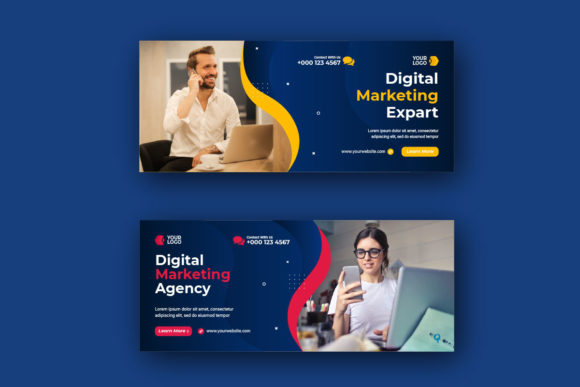
Elevating Your Brand: The Strategic Power of Business Corporate Facebook Cover Design
In the fast-paced digital landscape, first impressions are often made in a fraction of a second. For businesses, the Facebook page serves as a virtual storefront, a community hub, and a primary channel for customer engagement. At the very top of this digital real estate lies the Facebook Cover Photo. While many business owners focus heavily on their profile picture or their latest post, the cover image is arguably the most critical visual element for establishing brand identity. A well-crafted Business Corporate Facebook Cover Design does more than just fill space; it communicates professionalism, sets the tone for your brand narrative, and instantly tells visitors who you are and what you offer.
Understanding the nuances of corporate cover design is no longer just the domain of graphic designers. It is an essential skill for entrepreneurs, marketing managers, and small business owners who wish to stand out in a crowded marketplace. This guide will explore the significance of these designs, break down the technical requirements, and explain how utilizing editable templates can streamline your workflow while maintaining a high standard of quality.
Why Your Facebook Cover Matters More Than You Think
The cover photo is the largest image on your Facebook page. It spans the entire width of the desktop view and dominates the mobile experience. When a potential client lands on your page, this image is the first thing they see before reading a single word of your "About" section. Its purpose is threefold:
- Brand Recognition: It reinforces your logo, color palette, and typography, ensuring consistency across all marketing channels.
- Value Proposition: It offers a prime opportunity to display a tagline, a current promotion, or a clear statement of services.
- Trust and Professionalism: A pixelated, poorly cropped, or generic stock image can signal negligence. Conversely, a clean, eye-catchy professional design signals that you pay attention to detail and care about your customers' experience.
In modern business, credibility is currency. A sloppy header can inadvertently suggest that a company is outdated or unprofessional. On the other hand, a sleek, modern cover design aligns your business with contemporary standards, making it easier to convert casual browsers into loyal followers.
The Anatomy of a Perfect Corporate Cover
Creating a successful Business Corporate Facebook Cover Design requires balancing aesthetics with functionality. It is not merely about slapping a logo onto a background. Several key elements must work in harmony:
- Visual Hierarchy: The most important information (usually the company name or main offer) should be the most prominent. Secondary details should support, not compete with, the main message.
- Color Psychology: Colors evoke emotions. A law firm might choose deep blues and grays to convey stability, while a creative agency might opt for vibrant oranges or purples to suggest innovation. Consistency with your existing brand guidelines is crucial.
- Typography: Readability is king. Since the image scales differently on various devices, fonts must be bold enough to be read on a smartphone screen without losing elegance on a desktop monitor.
- Negative Space: Cluttered designs confuse the eye. Effective use of empty space helps guide the viewer's focus to the core message.
Bridging the Gap: Templates vs. Custom Design
A common misunderstanding among business owners is that a professional look requires an expensive agency contract or advanced design skills. This is where the concept of the editable template becomes a game-changer. High-quality templates, such as those available in Adobe Illustrator formats (.AI or .EPS), provide a foundation of professional design that anyone can customize.
These templates are designed to be "clean" and "eye-catchy," offering a sophisticated layout that has already solved the hard problems of composition and balance. For the user, the barrier to entry is significantly lowered. You do not need to be a graphic design expert; you only need to know the very basics of Adobe Illustrator. This accessibility empowers businesses to keep their social media fresh and relevant without breaking the bank.
Technical Essentials: What You Need to Know
When selecting or editing a template, understanding the technical specifications is vital for a polished result. Here are the critical factors to consider:
- File Formats (.AI and .EPS): These are vector-based file formats. Unlike standard images (like JPEGs), vectors use mathematical paths rather than pixels. This means you can scale the design up or down infinitely without losing quality. This is essential for ensuring your cover looks crisp on high-resolution Retina displays and large monitors.
- RGB Color Mode: Screens emit light, so digital designs must be created in the RGB (Red, Green, Blue) color mode. Using CMYK (used for print) can result in dull, inaccurate colors when viewed on Facebook. Ensuring your template is set to RGB guarantees vibrant, true-to-brand colors.
- High Resolution: Even though it is for the web, starting with a high-resolution canvas ensures that when the file is exported as a PNG or JPG for upload, the details remain sharp.
- Well-Organized Layers: A professional template will have a well-organized layer structure. Text, backgrounds, shapes, and placeholders should be on separate layers. This organization makes editing intuitive; you simply unlock the text layer to change your slogan or swap the image placeholder with your own team photo.
Practical Application: How to Customize Your Template
Let's walk through how a business might utilize a template in a real-world scenario. Imagine a local real estate agency wanting to highlight their new listings. They download a Business Corporate Facebook Cover Design template. The package includes an .AI file, is in RGB mode, and features free fonts.
First, they open the file in Adobe Illustrator. Because the file is fully editable, they locate the text layer containing the default headline "Your Business Name." They replace this with "Luxury Homes in [City Name]." Next, they adjust the color of the accent shapes to match their specific brand blue, which is easily done using the color picker tool. Finally, they drag and drop a high-quality photo of a featured property into the designated image placeholder. Note that while the template provides the structure, the specific images used in the preview mockups are usually not included, requiring the user to source their own photography—a small step that adds immense authenticity to the final product.
Once the edits are complete, they export the file as a high-quality PNG. The result is a custom-looking banner that took minutes to create but looks like it cost hundreds of dollars. This efficiency allows businesses to update their covers seasonally, for holidays, or to promote flash sales, keeping their page dynamic and engaging.
Common Pitfalls to Avoid
Even with a great template, mistakes can happen. Being aware of these common pitfalls ensures your final output is flawless:
- Ignoring the Mobile Crop: Facebook displays cover photos differently on mobile devices than on desktops. The mobile view crops the sides of the image. Always keep critical text and logos within the "safe zone" (the center 60% of the image) to ensure they aren't cut off on phones.
- Overcrowding: Just because you can edit every part of the template doesn't mean you should. Resist the urge to add too much text. Less is often more.
- Font Licensing: While many templates come with free fonts, always double-check the license if you plan to use the design for commercial purposes. Most "free" fonts for templates are free for personal and commercial use, but verification is a best practice.
The Broader Impact on Digital Strategy
Integrating a professional cover design into your workflow is about more than just aesthetics; it is about strategic communication. In an era where attention spans are shortening, your visual content must work harder. A cohesive visual identity across your website, business cards, and social media profiles builds a sense of reliability. When a customer sees the same colors, fonts, and style everywhere, it creates a psychological anchor of trust.
Furthermore, the ease of editing modern templates encourages experimentation. Businesses can A/B test different headlines or imagery to see what resonates best with their audience. This data-driven approach to design transforms the Facebook cover from a static decoration into a dynamic marketing tool.
In conclusion, the Business Corporate Facebook Cover Design is a pivotal element of your online presence. By leveraging high-quality, fully editable templates in .AI or .EPS formats, businesses of all sizes can achieve a polished, professional look. Whether you are a startup founder or a marketing veteran, understanding the principles of hierarchy, color, and technical specification allows you to harness the full potential of this digital billboard. With the right tools and a clear strategy, your Facebook cover can become a powerful asset that drives engagement, builds trust, and elevates your brand in the eyes of the world.