Why Your Youtube Thumbnail Strategy Might Be Holding Your Channel Back
In the crowded landscape of online video, the difference between a viral hit and a forgotten upload often comes down to a single visual element. A Youtube Thumbnail is not merely a decorative cover image; it is the primary gatekeeper for your content. It serves as the first point of contact with potential viewers, functioning much like a storefront window or a book cover. If the presentation is lackluster, confusing, or unprofessional, even the most high-quality video content inside may never get the chance to shine. Many creators, from seasoned entrepreneurs to hobbyist bloggers, underestimate the strategic weight of this small graphic, leading to missed opportunities for growth and engagement.
Understanding the mechanics behind an effective thumbnail is essential for anyone looking to build a sustainable presence on the platform. However, simply knowing you need one is not enough. The approach many take when creating these assets is fraught with common pitfalls that can silently degrade channel performance. By recognizing these errors early, you can shift your strategy from reactive guessing to proactive design, ensuring your visuals work as hard as your script.
The Trap of Cluttered Design and Poor Readability
One of the most frequent mistakes creators make is attempting to cram too much information into a tiny space. There is a misconception that a busy image conveys more value or excitement. In reality, a cluttered Youtube Thumbnail overwhelms the viewer's brain, causing them to scroll past without processing the core message. When text is illegible on a mobile screen or when too many facial expressions compete for attention, the result is cognitive friction. Viewers do not have the patience to decipher complex graphics while browsing; they need instant clarity.
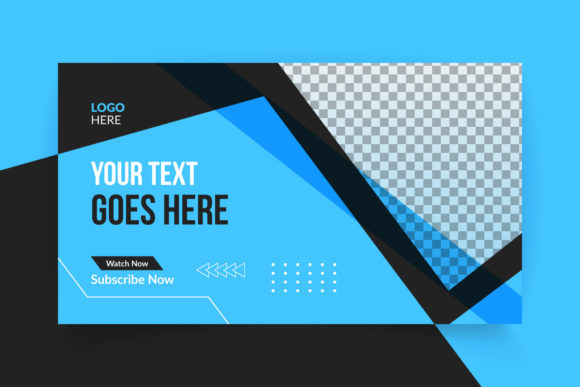
To avoid this, prioritize simplicity and hierarchy. Your design should communicate the video's premise in under two seconds. Use large, bold fonts that contrast sharply against the background. Limit your text to three or four words maximum, focusing on a hook rather than a summary. If you are using a template, such as a professional Youtube Thumbnail Template, take advantage of the pre-organized layers to ensure your text placement follows established design principles. These templates often utilize negative space effectively, guiding the eye naturally to the most important elements without the need for excessive decoration.
Misunderstanding Consistency and Brand Identity
Another area where creators often stumble is the lack of visual consistency across their channel. Some treat every video as an isolated event, resulting in a channel page that looks disjointed and amateurish. This inconsistency makes it difficult for returning subscribers to instantly recognize new content in their feed. Furthermore, it dilutes brand authority, making the channel appear less trustworthy to new visitors who are evaluating whether to subscribe.
A cohesive look does not mean every image must be identical; rather, it means adhering to a unified style guide. This includes using a consistent color palette, font family, and layout structure. For instance, if your brand colors are blue and white, your thumbnails should predominantly feature these hues. Utilizing a well-structured Youtube Thumbnail Template can solve this issue efficiently. These resources allow you to maintain a professional standard across hundreds of videos with minimal effort. By simply swapping out the central image and updating the text within a standardized framework, you ensure that every upload reinforces your brand identity rather than weakening it.
The Technical Oversights That Ruin Quality
Beyond aesthetics, technical specifications play a critical role in how your thumbnail renders across different devices. A common error is uploading images that are not optimized for the platform's requirements, leading to pixelation, blurriness, or awkward cropping. YouTube recommends a resolution of 1280x720 pixels with a 16:9 aspect ratio. Ignoring these standards can result in a fuzzy image that looks unprofessional, particularly on large screens or high-definition monitors.
Moreover, many beginners struggle with the software required to create high-fidelity graphics. They might rely on basic tools that limit their creative control or produce low-resolution exports. This is where having access to editable vector files becomes invaluable. A high-quality Youtube Thumbnail Template typically comes in formats like AI or EPS, which are scalable without losing quality. Even if you only possess basic knowledge of Illustrator, these files are designed to be user-friendly. You can easily modify text, adjust colors, and replace images while maintaining crisp edges and professional typography. Remember, the preview mockups you see online often use high-end photography; ensure you source your own images at similar quality levels to match the template's potential.
Evaluating Tools and Resources Wisely
When selecting resources to aid your design process, it is crucial to evaluate what is actually included in the package. A frequent source of frustration occurs when creators download a template expecting certain assets, only to find that key elements like specific fonts or stock photos are not included. Always check the file details before committing. A reliable template will clearly state that images are not included but will provide a well-organized layer structure to make your own image insertion seamless.
Additionally, consider the learning curve associated with the tool. While powerful software like Adobe Illustrator offers unparalleled control, it can be intimidating for novices. However, the right template bridges this gap. Look for features described as "well organized" and "easy to edit." These indicators suggest that the designer has grouped layers logically, named them clearly, and perhaps even used smart objects to simplify the replacement process. This allows you to focus on the creative decision-making—choosing the right expression, the right color psychology, and the right message—rather than getting bogged down in technical hurdles.
Making the Right Choice for Long-Term Success
Ultimately, the goal is to create a workflow that is both efficient and effective. Spending hours wrestling with design software for every single video is unsustainable for most creators. Conversely, using generic, low-effort images fails to capture attention. The balanced approach lies in leveraging professional frameworks that streamline production without sacrificing quality. By investing time in setting up a robust system now, perhaps by acquiring a versatile Youtube Thumbnail Template that suits your niche, you save countless hours in the future.
Before finalizing any design, ask yourself a few critical questions: Is the text readable on a smartphone screen? Does the image accurately reflect the video content without being clickbait? Does this align with my previous ten videos? If the answer to any of these is no, revisit your design. Small adjustments in contrast, spacing, or imagery can yield significant improvements in click-through rates. Treat your thumbnails as a vital component of your content strategy, not an afterthought. With the right tools and a mindful approach to common pitfalls, you can elevate your channel's presentation and connect more deeply with your audience.