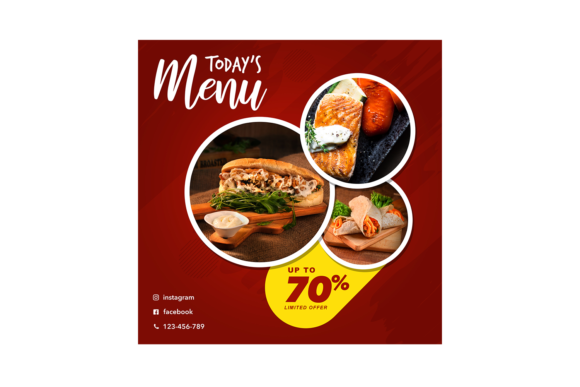
Today's Menu Instagram Post: Edit & Engage
In the fast-paced world of social media, consistency is often the difference between a thriving community and a stagnant feed. For restaurant owners, food bloggers, and cafe managers, the daily question isn't just "what are we serving?" but "how do we show it off?" This is where a dedicated template like Today's Menu - Instagram Post becomes an invaluable asset. It serves as a bridge between your culinary creations and your audience's appetite, offering a professional look without requiring hours of graphic design work.
At its core, this resource is a pre-designed layout specifically engineered for square-format social platforms. With dimensions set at 3000×3000 pixels, it ensures that every image you upload remains crisp and high-definition, whether viewed on a smartphone or a desktop monitor. The true power of this tool lies in its flexibility. It is not a static image; it is a dynamic workspace built within Adobe Photoshop that allows you to swap out content instantly while maintaining a cohesive brand aesthetic.
Why Smart Object Replacement Changes the Game
For many small business owners and freelancers, the technical barriers of graphic design can be intimidating. You might have great photos of your dishes but lack the skills to blend them seamlessly into a complex layout. This template solves that problem through Smart Object Replacement. This feature is a game-changer for beginners and professionals alike because it automates the most difficult part of editing: sizing, masking, and blending.
When you open the included PSD file, you will find specific layers marked as smart objects. Instead of manually cutting out a photo of a burger or resizing it to fit a frame, you simply double-click the layer icon, paste your new image, save, and watch it automatically snap into place. The template handles the lighting adjustments and perspective, ensuring your food photography looks integrated rather than slapped on top. This efficiency means you can update your daily specials in minutes rather than hours, keeping your content fresh and relevant.
Organized Layers for Stress-Free Editing
One of the most frustrating experiences when downloading free or paid design resources is opening a file to find a chaotic mess of unnamed layers. A professional workflow demands order, and this template delivers exactly that with its Organised Layers structure. Every element, from the background textures to the typography and the image placeholders, is logically named and grouped.
This organization supports a wide range of users. If you are an educator teaching digital marketing, you can use this file to demonstrate proper layer management. If you are a busy entrepreneur, you can quickly locate the text layer to change the price or description of a meal without accidentally moving other design elements. The clarity of the file structure reduces the risk of errors and makes the editing process intuitive, even for those who only open Photoshop occasionally.
Practical Uses Beyond the Daily Special
While the name suggests a focus on daily menus, the versatility of this 3000×3000 pixel canvas extends far beyond listing lunch options. Consider the various contexts where high-quality visual communication is essential:
- Seasonal Promotions: Quickly adapt the template for holiday specials, such as Valentine's Day desserts or summer drink menus, by swapping images and adjusting color tones.
- Event Announcements: Use the layout to promote live music nights, chef takeovers, or cooking classes hosted at your venue.
- User-Generated Content: Feature photos sent in by happy customers. The smart object feature makes it easy to showcase real people enjoying your products, which builds significant social proof.
- Blog and Website Headers: Because of the high resolution, these square graphics can also serve as featured images for blog posts about recipes or restaurant news.
The appeal here is the ability to maintain a consistent visual identity. By using the same foundational design for different types of posts, your Instagram grid looks curated and professional. This consistency helps followers recognize your brand instantly as they scroll through their feeds.
What You Actually Receive and How to Start
When you acquire this resource, you aren't just getting a picture; you are getting a complete toolkit. The package typically includes the main PSD file ready for editing, a Preview jpg file so you can see the final potential before you start, and a Read Me.txt document. This text file is crucial for beginners, as it often contains instructions on how to access the smart objects, recommended font links, and usage rights.
It is important to note a key detail mentioned in the product features: Image is not included for preview purpose only. This is standard practice in the design industry to protect the intellectual property of the photographers who took the sample shots. When you begin editing, you will need to replace these placeholder images with your own photography. This requirement actually works in your favor, as it ensures your final output is unique to your business and not identical to hundreds of other accounts using the same template.
Considerations Before You Begin
Before diving into editing, there are a few practical things to consider to ensure you get the best results. First, assess your photography. Since the template relies on Smart Object Replacement, the quality of your final post is heavily dependent on the quality of the photos you insert. Ensure your food photos are well-lit and high-resolution to match the 3000×3000 pixel canvas. Blurry or dark images will stand out negatively against a polished design.
Secondly, verify your software compatibility. While this is an easy-to-edit file, it does require Adobe Photoshop. If you are a casual user without a subscription, you might need to explore alternative methods or consider the investment worthwhile for the time saved. However, for marketers and creators already in the Adobe ecosystem, this file integrates seamlessly into existing workflows.
Finally, think about your brand voice. The template provides the structure, but you provide the personality. Don't be afraid to tweak the text colors or fonts slightly if they align better with your specific branding guidelines, provided you keep the overall harmony of the design intact. The organized layers make these minor customizations safe and simple to execute.
In summary, Today's Menu - Instagram Post is more than just a digital file; it is a productivity booster for anyone looking to elevate their social media presence. Whether you are a hobbyist sharing homemade bakes or a professional managing a chain of cafes, the combination of high resolution, smart editing features, and organized structure provides a solid foundation for visual storytelling. By removing the technical friction of design, it allows you to focus on what truly matters: creating delicious content that engages your audience.