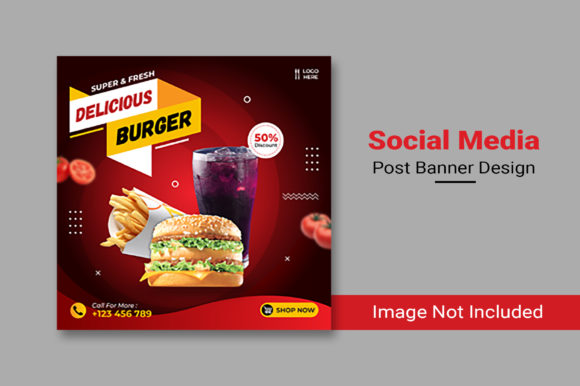
Evaluating the Delicious Burger Social Media Post Template for Restaurant Marketing
In the competitive landscape of food service marketing, visual consistency and speed of execution are often the deciding factors between a post that gets scrolled past and one that drives foot traffic. For restaurant owners and social media managers, the Delicious Burger Social Media Post template represents a specific category of design resource: a pre-structured, high-fidelity layout tailored specifically for burger-centric promotions. Understanding whether this type of specialized asset fits your workflow requires a clear look at its technical specifications, its advantages over generic design tools, and the scenarios where it offers the most value.
At its core, this resource is a PSD Smart Object file, sized at 2000×2000 pixels in RGB color mode at 72 DPI. These technical details are not merely specifications; they define the utility of the file. The 2000×2000 dimension ensures that the image remains crisp on high-resolution retina displays and modern smartphones, which is critical for food photography where texture and detail drive appetite appeal. The RGB color space is optimized for digital screens, ensuring that the vibrant reds of a tomato or the golden hues of a bun appear exactly as intended on Instagram, Facebook, and TikTok feeds.
The Distinct Value of Specialized Food Templates
What sets the Delicious Burger Social Media Post apart from a generic square canvas is the intentional arrangement of layers and placeholders. Unlike starting from scratch in a design program, where you must determine hierarchy, font pairing, and negative space, this template provides a fully editable framework where the focus is already established. The "Well Organized Layer" structure mentioned in the file description is a significant time-saver. In professional design, a chaotic layer panel can double the time required to make simple edits. A well-organized file allows a user to quickly locate the text layer for the price, the smart object for the burger image, and the background elements without hunting through dozens of unnamed groups.
The use of Smart Objects is particularly relevant for non-designers or busy restaurant staff. A Smart Object allows you to replace the placeholder image with your own photograph simply by double-clicking the layer, pasting your new image, and saving. The template automatically handles the scaling, cropping, and masking. This eliminates the common error of stretching an image disproportionately or failing to align it with drop shadows and lighting effects that were baked into the original design. For a burger joint, where the product is the hero, maintaining realistic lighting and shadow integration is essential for credibility.
Comparing Dedicated PSD Templates vs. DIY Design Platforms
When evaluating resources for social media content, restaurant operators typically weigh dedicated PSD templates against browser-based DIY design platforms. Both have their place, but they serve different operational needs.
Browser-based tools offer ease of access and a drag-and-drop interface. They are excellent for users with zero design software knowledge. However, they often come with limitations regarding file ownership, resolution constraints on free tiers, and a "cookie-cutter" aesthetic that many competitors may also be using. Furthermore, customizing a complex effect, such as a specific glaze overlay or a custom typography treatment, can be difficult or impossible within the rigid constraints of a web editor.
In contrast, the Delicious Burger Social Media Post PSD template offers granular control. Because it is a native Photoshop file, you have access to the full suite of adjustment layers, blending modes, and filters. If your brand colors require a specific hex code that isn't available in a preset palette, you can apply it instantly. If you need to adjust the curvature of a text banner to match a unique logo shape, the vector tools in Photoshop allow for that precision. The tradeoff, naturally, is the requirement of having Adobe Photoshop installed and a basic understanding of how to navigate the interface. For businesses that already utilize Photoshop for menu design or print ads, this template integrates seamlessly into an existing workflow.
Assessing the "Image Not Included" Factor
A crucial distinction to make when downloading this template is that the main file does not include the food photography seen in the preview mockups. This is a standard industry practice but often a point of confusion for first-time buyers. The template provides the stage, not the actor. This means the success of the final post relies heavily on the quality of the images you supply.
This limitation can actually be viewed as a strength. It forces the business to use authentic photography of their actual products rather than relying on stock images that may look generic or unappetizing. A burger template is only as good as the burger photo placed within it. If a restaurant has high-quality, professionally lit photos of their signature dish, this template will elevate them. If the source images are dark, blurry, or poorly styled, even the best template cannot fully rescue the visual impact. Therefore, before investing time in editing this template, ensure you have a library of high-resolution food photography ready to go.
Ideal Use Cases and Strategic Fit
Determining when to utilize the Delicious Burger Social Media Post template depends on your current marketing velocity and brand maturity. This resource is ideally suited for:
- Weekly Specials Promotions: When you need to announce a "Burger of the Week" quickly, the smart object feature allows you to swap the image and update the text in minutes, maintaining a consistent look across all posts.
- Franchise or Multi-Location Consistency: If you manage social media for several locations, providing each manager with this editable template ensures that while the specific burger photo changes per location, the branding, fonts, and layout remain uniform.
- Limited-Time Offers (LTOs): During high-pressure periods like summer grilling seasons or holiday promotions, having a pre-designed layout reduces the cognitive load on your marketing team, allowing them to focus on copy and strategy rather than layout mechanics.
However, there are scenarios where this specific template might not be the optimal choice. If your brand identity relies heavily on hand-drawn illustrations, abstract art, or a minimalist aesthetic that differs significantly from the bold, appetizing style typical of burger templates, forcing your content into this mold could dilute your brand voice. Additionally, if your team lacks access to Photoshop or the skills to edit PSD files, the learning curve may outweigh the time saved by using a template. In such cases, a simpler tool or hiring a freelance designer for a custom set of assets might be more cost-effective in the long run.
Making the Decision: Factors to Consider
Before integrating this template into your content calendar, consider the following decision factors:
- Software Proficiency: Do you or your team have confidence in navigating Photoshop layers and smart objects? If the answer is no, factor in the time required to learn these skills.
- Photography Assets: Do you have a steady stream of high-quality, 2000px+ wide images of your burgers? Without these, the template's potential is limited.
- Brand Flexibility: Does the style of the template align with your existing brand guidelines? Check the font styles and color overlays in the preview to ensure they don't clash with your logo or website.
- Volume of Content: Are you posting frequently enough to justify the setup time? If you only post once a month, a custom design might be worth the effort. If you post daily, a template system is almost mandatory for efficiency.
Ultimately, the Delicious Burger Social Media Post template is a tool designed to bridge the gap between professional design quality and the rapid pace of social media publishing. It removes the guesswork from composition and allows restaurant marketers to focus on what matters most: showcasing delicious food. By understanding its technical requirements and comparing it against your internal capabilities, you can decide if this resource will streamline your workflow or add unnecessary complexity. For those with the right images and software skills, it offers a robust foundation for building a visually compelling and cohesive social media presence.